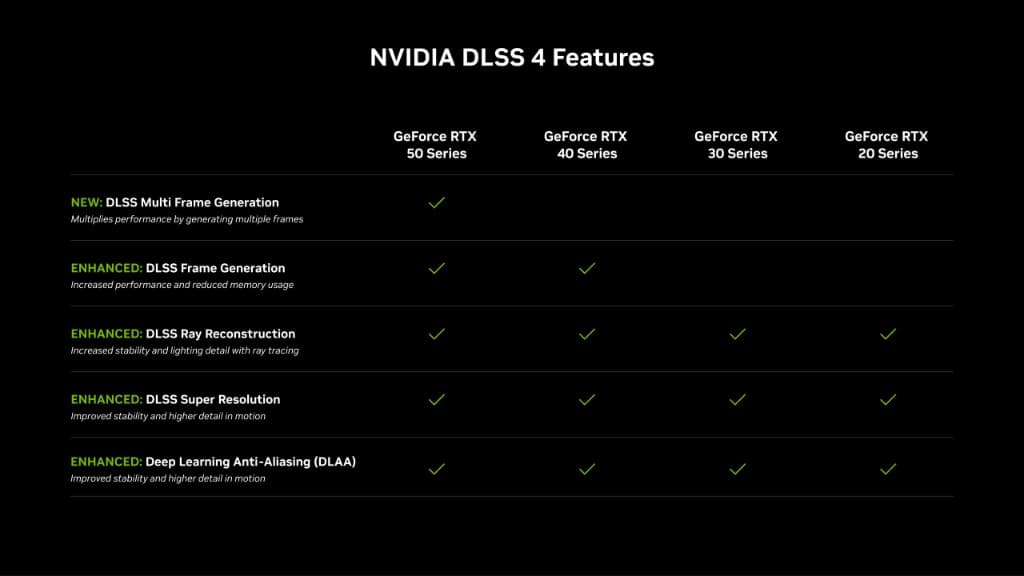
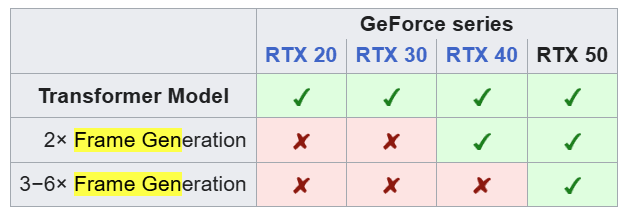
Yes, RTX 20, 30, and 40 series graphics cards can use the latest DLSS (such as DLSS 4.5). However, while they support the latest Super Resolution and Ray Reconstruction AI models, exclusive features like Frame Generation remain limited by hardware generation.
With the launch of the RTX 50 series, many users are wondering if their current hardware is rendered obsolete. The short answer is no, but there are significant nuances in how AI-driven performance scaling works on older architectures compared to the new Blackwell generation.
DLSS Feature Support by Generation
RTX 40 Series
Supports the latest DLSS Super Resolution, DLSS Ray Reconstruction, and Frame Generation.
RTX 20 & 30 Series
Supports the latest DLSS Super Resolution and Ray Reconstruction. Because these older architectures lack native FP8 hardware acceleration, the AI calculations run using INT8, which can result in a performance drop compared to older DLSS versions but a superior Image quality. You may need to use more aggressive upscaling presets to maintain framerates. They do not support DLSS Frame Generation (which is exclusive to the 40 and 50 series).
How to use the latest DLSS (DLSS 4.5) on RTX 20, 30, and 40
NVIDIA has made it easier than ever to force the latest AI models into your favorite games via the NVIDIA App. Follow these steps to ensure you're getting the best possible image quality on your existing hardware.
Update your software
Ensure you have the NVIDIA app installed on your PC and download the latest GeForce drivers.
Opt into experimental features
Open the NVIDIA App, go to Settings > About, and tick the checkbox to opt-in for beta/experimental features.
Enable DLSS Override
In the NVIDIA App, go to the Graphics tab, select DLSS Override - Model Preset, and choose the latest Recommended option. You can apply this globally or per game.
Activate in-game
Launch your game, open the display/graphics settings, and enable DLSS Super Resolution.
The Bottom Line
If you are a competitive gamer on an RTX 20 or 30 series card, the upgrade to RTX 50 is significantly more compelling due to Frame Generation and native FP8 acceleration. However, for most users purely seeking image quality improvements, your current gear is still very much in the game.
Share this article to fellow gamers